Hore: Unlocking Vintage Charm Without the Technical Headaches
When you are looking for a display font that commands attention while whispering nostalgia, Hore stands out as a standout choice. This isn't just another retro typeface; it is a meticulously crafted tool designed to bring a cool, vintage aesthetic to modern projects. Whether you are designing a boutique logo, creating a social media campaign for a small business, or simply adding flair to a personal blog, Hore offers a distinct personality that generic fonts often lack.
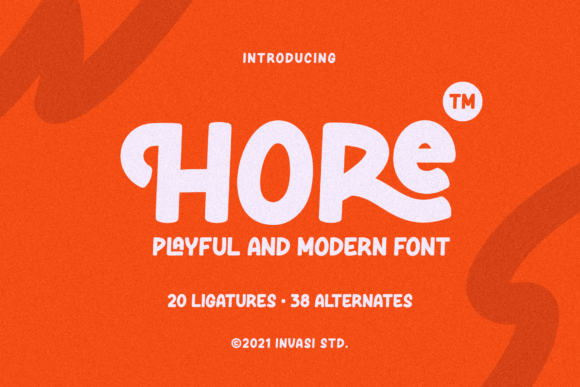
The primary reason creators gravitate toward this font lies in its unique encoding system. Unlike standard fonts that limit your access to characters, Hore is PUA encoded. This technical detail might sound dry, but it translates directly into creative freedom. It means you can access a vast library of amazing glyphs and ligatures with ease, allowing for intricate designs that would otherwise require complex workarounds or multiple font files.
Why PUA Encoding Matters for Your Design Workflow
Many designers, especially those new to typography, make the mistake of assuming all fonts function the same way. You might download a free vintage style font, only to find that your special symbols, arrows, or decorative ornaments are missing. This leads to frustration and a compromised final product. With Hore, you avoid this common pitfall entirely because of its PUA (Private Use Area) encoding.
PUA encoding places specific glyphs in a reserved section of the Unicode character set. While this requires a bit more setup initially compared to standard text, it unlocks a world where every single decorative element is accessible without cluttering your main alphabet. The result is a seamless workflow where you can insert complex ligatures and unique symbols using simple keyboard shortcuts or character maps, rather than hunting through endless menus.
If you ignore this feature, you risk wasting hours trying to manually construct shapes or settling for lower-quality alternatives. By understanding and utilizing the PUA capabilities of Hore, you ensure that your project maintains high quality and professional polish from start to finish.
Avoiding Common Pitfalls in Font Selection
Selecting a display font involves more than just liking how it looks on a screen. A frequent error among beginners and even seasoned professionals is evaluating a font based solely on its preview image without checking its technical specifications. When considering Hore, you must verify that your design software supports PUA characters correctly. If your application does not recognize these codes, the special glyphs may appear as empty boxes or question marks, ruining the visual integrity of your layout.
Another overlooked detail is the context of usage. Hore is a display font, which means it is optimized for headlines, titles, and large-scale graphics. Using it for body text or long-form content is a strategic mistake that will reduce readability and alienate your audience. Display fonts like Hore are meant to be seen briefly and remembered; they carry too much stylistic weight to be used effectively for paragraphs of text.
To avoid these issues, always test your chosen font across different platforms before committing to a full project. Check how the ligatures render in your preferred word processor or design tool. Ensure that the file format is compatible with your operating system. By taking these precautions, you prevent costly rework and ensure that the vintage charm of Hore shines through without technical glitches.
Evaluating Quality Before You Download or Buy
Not all vintage-style fonts are created equal. Some suffer from poor kerning, inconsistent stroke widths, or broken paths that look jagged when scaled up. When evaluating Hore, or any similar typeface, you should look beyond the initial "cool factor." Examine the letterforms closely. Do the curves flow naturally? Are the serifs crisp and well-defined? Does the spacing between letters feel balanced?
A common mistake is purchasing a font based on a low-resolution thumbnail. High-resolution testing is essential. Zoom in to 400% or more to inspect the vector outlines. For a PUA-encoded font like Hore, pay special attention to the decorative elements. Are they connected smoothly, or do they look disjointed? Poorly constructed ligatures can make a design look amateurish, undermining the credibility of your brand or message.
Furthermore, consider the versatility of the font family. Does it come with multiple weights? Are there complementary styles available? A robust collection allows for better hierarchy in your designs, enabling you to create contrast between headings and subheadings without switching to a completely different typeface. If Hore offers a comprehensive set of variations, it becomes a more valuable asset for your toolkit, saving you time and money in the long run.
Practical Tips for Maximizing Hore's Potential
Once you have ensured the technical compatibility and quality of the font, the next step is to use it strategically. One effective approach is to pair Hore with a clean, neutral sans-serif font. This combination creates a striking contrast that highlights the vintage nature of Hore while maintaining overall legibility. For example, use Hore for your main headline and a simple geometric sans-serif for the supporting details.
Another practical tip is to leverage the ligatures intentionally. Don't just use them for decoration; use them to improve the rhythm of your text. Ligatures can connect letters in a way that feels more organic and handcrafted, enhancing the vintage vibe. However, be careful not to overuse them. Too many decorative elements can clutter the design and distract from the core message.
- Check Software Support: Ensure your design tools are updated to support PUA characters.
- Test at Scale: Preview the font at both small and large sizes to ensure clarity.
- Pair Wisely: Combine Hore with simple fonts to let the display type take center stage.
- Review Licensing: Always read the license agreement to understand where and how you can use the font commercially.
By following these guidelines, you transform Hore from a simple download into a powerful component of your design strategy. It allows you to communicate your brand's story with authenticity and style, avoiding the generic look that plagues so many modern designs.
Final Thoughts on Making the Right Choice
Choosing the right typography is an investment in the perception of your work. When you select Hore, you are opting for a font that balances historical charm with modern functionality. Its PUA encoding removes barriers to creativity, giving you access to a rich array of symbols that elevate your designs. However, success depends on your ability to navigate the technical nuances and apply the font appropriately.
Don't let technical limitations hold you back. Instead, embrace the learning curve associated with specialized fonts. Take the time to explore the glyphs, test the rendering, and experiment with combinations. By doing so, you ensure that your projects benefit from the full potential of Hore, resulting in visuals that are not only beautiful but also functional and professional. In a crowded digital landscape, having a font that truly stands out can make all the difference, and Hore provides exactly that edge.
Remember, the goal is to enhance communication, not obscure it. Use Hore to add character and warmth to your content, but always keep the user experience in mind. With the right approach, this vintage-styled display font becomes an indispensable tool in your creative arsenal, helping you achieve results that resonate with your audience.